


In this piece
I am rewriting a supermarket point-of-sale system: scanning items, applying promotions, taking payments, printing receipts. The existing software has accumulated nearly twenty years of behaviour. I am rebuilding it in weeks, with agents writing most of the code.
Five or six user stories can be in flight at once. The agents work in parallel. I review what they deliver.
That is where the pace breaks down.
An agent finishes a story and opens a merge request. Then another does. Each comes with a description, tests and enough changed code to deserve twenty minutes of attention. The work is ready faster than I can properly review it.
I have caught myself approving a diff I had barely read. Everything looked plausible, the tests passed, and the next merge request was already waiting.
I needed a way to see what each agent had actually delivered. So I started asking for a short before-and-after video with every merge request.
Show me the feature working#
The video answers a straightforward question: does the application now do what the ticket asked for?
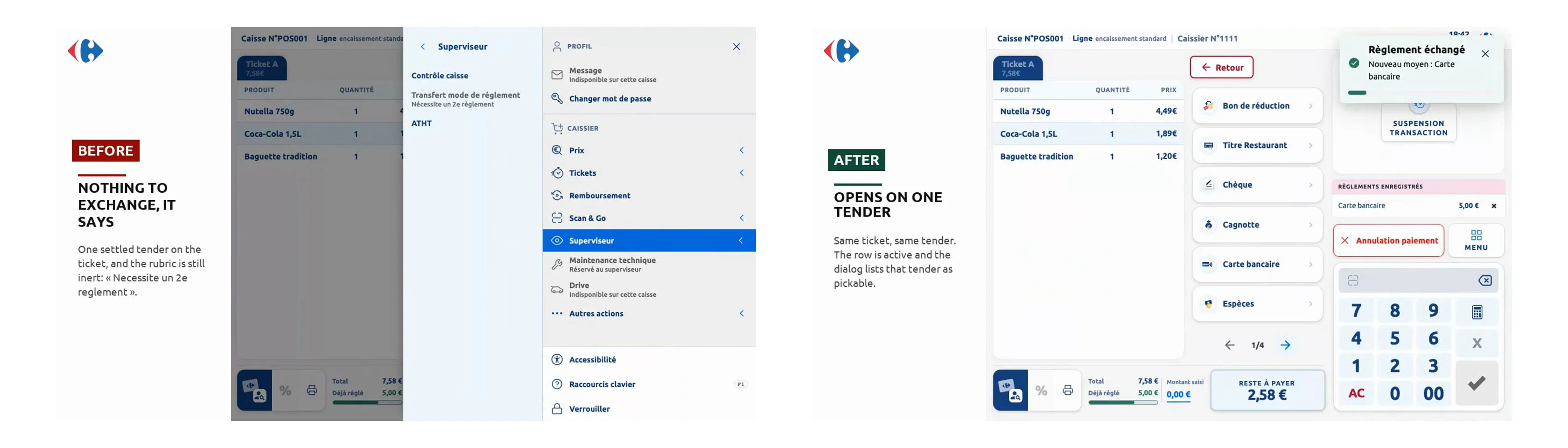
It shows the ticket, the relevant flow before the change, then the same flow after it. Usually in under a minute. Enough to see the action and its result, without opening a local environment or reconstructing the feature from the diff.
Here is a real example. The ticket concerned the checkout’s toast notifications, which drew a countdown bar that read like a loader, as if the cashier had something to wait for. The clip shows the problem, then the corrected behaviour. It takes under twenty seconds.
That gives me a concrete starting point for the review. I can compare the result with the request, then read the code knowing which behaviour it is supposed to produce. If the agent has misunderstood the ticket, I can spot it before spending twenty minutes on the implementation.
The agent delivers the evidence too#
Recording these videos myself would only move the bottleneck. The agent has to produce them as part of the work.
The flow is simple:
- The agent reads the user story directly from Jira.
- It writes the tests and implements the change.
- It runs the build and starts the application.
- It plays the relevant browser flow and records the before-and-after screens.
- It assembles the video and attaches it to the merge request and the Jira ticket.
I use LeClap for the last step. It turns the recordings into a short clip with a title and before-and-after labels. The agent calls it through MCP, the interface that lets it use tools directly.
The footage comes from the running application. The editor arranges those recordings into a fixed template. That matters: I want to see what the application did, and be able to trace it back to the recorded flow.
The video arrives with the code, ready to watch. I do not have to ask the agent for a demonstration in a separate conversation.
What changes when six stories arrive together#
Without the video, each merge request asks me to rebuild the same context: what was requested, how the screen worked, what the agent changed, and whether those changes match the request.
With the video, I can start by watching the result. A short clip fits between two meetings. It makes it easier to identify a story that needs clarification and to enter the code review with a specific question in mind.
I still need to read the code. A video cannot tell me whether a payment calculation is correct in every case, whether permissions are enforced, or whether the implementation will be maintainable. Tests and code review still have that job.
But it helps separate two questions that otherwise get tangled together: did the agent build the requested behaviour, and is the implementation sound? Seeing the first makes it easier to concentrate on the second.
QA benefits too. The tester picks up a ticket with a demonstration already attached. They can see the intended change and use it as a starting point for their own checks, including the cases the clip does not show.
The video has to earn its trust#
Getting the first clips right took more work than I expected. Some recordings missed the useful moment. Others cut off the part of the screen where the change happened. The video played perfectly, but did not show what I needed to verify.
That is the lesson worth keeping from the editing details: a finished video is not automatically useful evidence.
I put the recording and editing instructions into a reusable skill, a document the agent reads before doing the job. It describes the format, what must remain visible, and the checks to run before attaching the result. The agent can reuse that process on the next ticket instead of improvising it again.
The same discipline that applies to the code applies to its demonstration: check that it does what it is supposed to do.
Finishing includes showing#
Working with agents has made it much easier to produce several implementations at once. My capacity to understand and approve them has not grown at the same rate.
The before-and-after video is how I am closing part of that gap. It gives me a quick view of the delivered behaviour, gives QA context, and leaves a demonstration alongside the ticket and the code.
For this workflow, an agent’s job now includes showing what it changed. When six stories land together, that makes the review queue easier to work through without relying on a convincing summary and a green build.
LeClap is open source under the MIT licence: github.com/heristop/leclap. The renderer is available on npm as ffmpeg-video-composer, with a command-line interface and an MCP server.
When agents build in parallel, human review becomes the bottleneck. A short before-and-after video gives me a way to check the delivered behaviour and focus my code review. Producing that evidence is now part of the agent's job.
Explore More